
RND synth
Manual
This manual is up to date for RND synth firmware version 1.3. Update here.
Features
8 synthesis engines: subtractive, fm, acid, noise, speech, karplus-strong, supersaw, additive
4 simultaneous instruments per patch, individually mixable
4 simultaneous euclidean sequences, playable over MIDI (see below)
20 scales
4-track audio output over usb-c (one track per instrument, pre-reverb)
4-channel MIDI in: play RND synth with keyboards or sequencers (usb-c + trs mini jack type a)
4-channel MIDI out: send 4 random sequences to other instruments (usb-c)
9 MIDI modes: see manual.
MIDI clock in (usb-c + trs mini jack)
analog sync in and out (2 ts mini jack)
stereo mix out (trs mini jack / post-reverb)
power 5V, 1A (usb-c)
4 294 967 296 sounds (random seeds)
more to come
Patch types
RND synth generates 3 types of patches :
looping sequences
jingles - sequences that play just once. you can still change their root note and scale and replay them with a midi “play” message (transport control).
drones - no midi sequence, just one midi note at the beginning, and then modulation.
Patch types apply to all 4 tracks of a patch.
Note that not all 4 tracks are always active. The number of active tracks per patch is random.
Connectivity
Midi modes (inputs)
midi channel 1 — global control
- tonic note selection / global transpose - the chosen tonic note is kept when you press the button
- master volume (midi cc 7)
- reverb level of all tracks (midi cc 91)
- scale selection (midi cc 9)
- 0–6: major
- 7–12: minor
- 13–19: harmonic minor
- 20–25: blues
- 26–31: major pentatonic
- 32–38: minor pentatonic
- 39–44: dorian
- 45–51: phrygian
- 52–57: lydian
- 58–63: mixolydian
- 64–70: locrian
- 71–76: whole tone
- 77–83: double harmonic
- 84–89: hungarian minor
- 90–95: phrygian dominant
- 96–102: hirajoshi
- 103–108: in sen
- 109–115: prometheus
- 116–121: octatonic
- 122–127: persian
midi channels 2 to 5 — play one track, let the others run
send notes to midi channel 2, 3, 4, or 5 to take over track 1, 2, 3, or 4 respectively.
the random sequence on that track stops, and you play it yourself — with a midi keyboard, a sequencer, or any midi source. the three other tracks keep playing their random sequences.
midi cc 7 controls the volume of the track you are playing.
midi cc 91 controls the level of reverb of the track you are playing.
midi channels 6 to 9 — play one track solo
send notes to midi channel 6, 7, 8, or 9 to play track 1, 2, 3, or 4, respectively, in solo mode.
the random sequences on all four tracks are stopped. only the track you are sending midi notes to is heard.
midi cc 7 controls the volume of the track you are playing.
midi cc 91 controls the level of reverb of the track you are playing.
use midi channels 6 to 9 at the same time to control all tracks! when you do, pressing the button will only change timbers.
a few notes:
- not every patch uses all four tracks — some channels may be inactive depending on what RND synth generates.
- each instrument responds to note, velocity, pitchbend, and aftertouch
- each instrument can be polyphonic (4-voice), or not, randomly
Midi modes (outputs)
RND synth tracks 1 to 4 send their random midi sequences respectively to midi channel 1 to 4. you can route each midi channel with a midi router or DAW.
Note that patch type drone doesn’t generate midi sequences.
FAQ / set up + troubleshooting
-
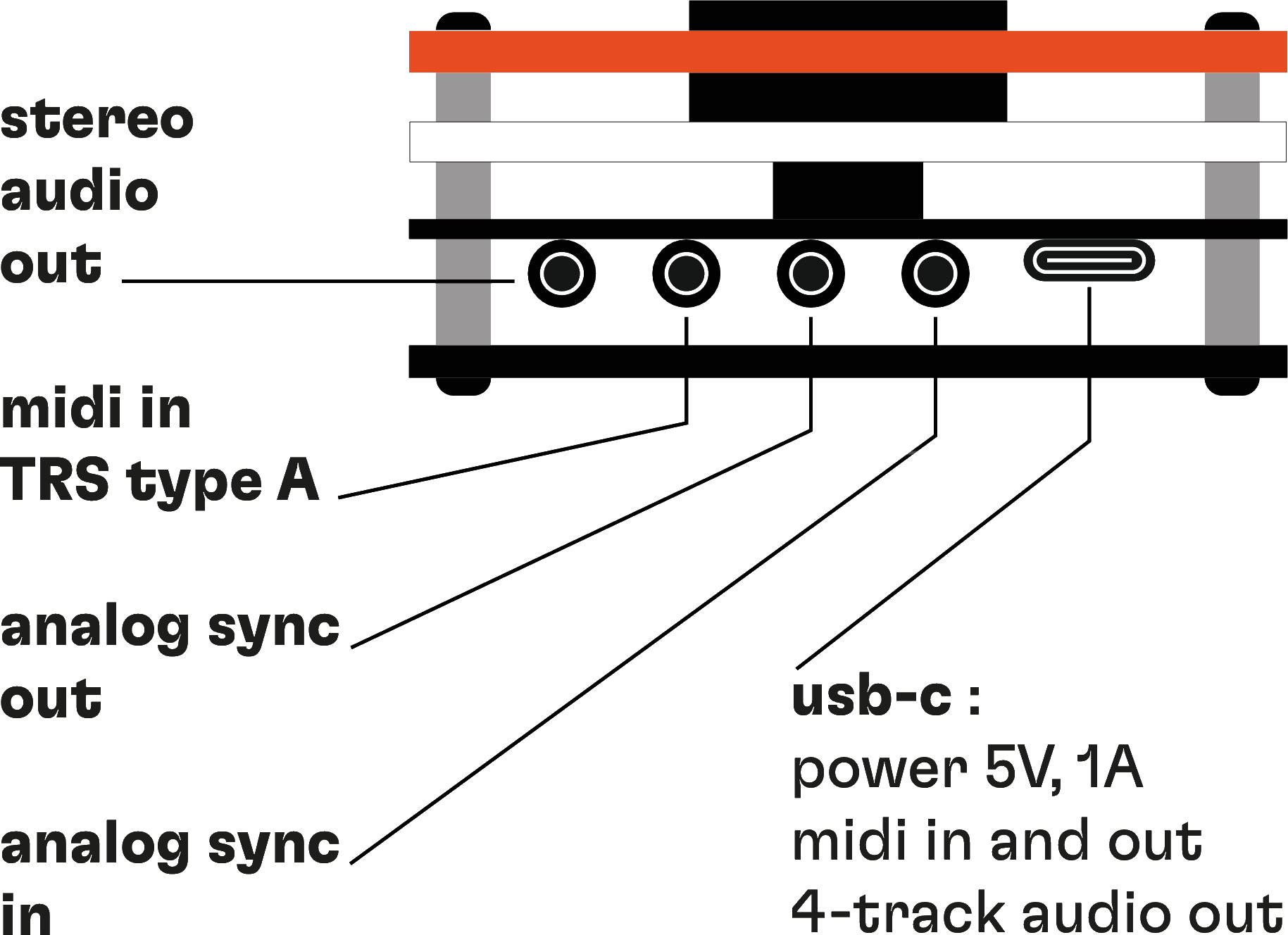
RND synth has four minijack sockets and a usb-c port. from left to right:
→ stereo audio out (trs minijack) — the full mix, with reverb and stereo panning. this is the one to send to a mixer, an audio interface, or headphones.
→ midi in (trs minijack, type a) — play RND synth from a keyboard or a sequencer. this port is input only.
→ analog sync out (ts minijack) — send a 2 ppqn clock to other gear.
→ analog sync in (ts minijack) — follow a 2 ppqn clock from other gear.
→ usb-c — power (5V, 1A), midi in and out, and 4-track audio out (one mono track per instrument, pre-reverb).
three typical setups:
→ with a computer — one usb-c cable does everything: power, midi in and out, and the four audio tracks into your daw. make sure the cable carries data and not just power.
→ with hardware only — power RND synth from any 5V usb charger, send it midi or an analog clock, and take the stereo out to your mixer.
→ both at once — usb-c to the computer for power, midi and multitrack audio, and the post-reverb stereo out to your mixer or headphones.
-
first, check that your usb-c cable carries data and not just power. many charging cables are power-only.
-
this is by design.
there are 3 patch types:
→ looping sequences
→ drones
→ jingles
they have different behaviors: drones are forever, sequences are looping, and jingles only play once. -
some midi controllers can send cc messages.
if you use ableton live 12, use the native midi effect ‘CC control’.
if you use ableton live 11 or below, use this device.
-
this is achieved using the RND synth midi out feature.
the usb-c port constantly sends the midi notes generated by the RND synth’s 4 tracks, on midi channels 1 to 4.
connect RND synth via usb-c to a midi router or use a DAW to route the 4 channels, and send random sequences to 4 other instruments.the 4 random sequences will always share the same scale, tonic note, and tempo, so it will always be musical.
note that the midi trs port is for midi in only, not midi out.
-
first of all, update RND synth to its latest firmware version here.
select WASAPI (Windows Audio Session API) as your audio driver: RND synth shows up as an audio interface with its four inputs.
if your daw doesn’t support WASAPI (Ableton Live and FL Studio, for example), select ASIO as the audio driver and use FlexASIO or ASIO4ALL: RND synth can then be selected in their configuration panel.
-
in some very rare cases, the booting of the RND synth was a bit too long in its first firmware version, and the computer interpreted that lack of response as a non-recognized device, that's why you couldn't interact with it.
to solve this problem, you can update RND synth to its latest version, available here.
this will fix the booting, some compatibility issues with different OS and machines, and upgrade its stability.
-
this is possible only on Mac.
create an aggregate device in audio MIDI setup: it combines RND synth and your audio interface into a single device for your daw.
→ open Applications → Utilities → Audio MIDI Setup
→ in the Audio Devices window, click “+” (bottom left) → Create Aggregate Device
→ tick RND synth and your audio interface, and choose one as the clock source (usually your main interface)
→ in your daw, select this aggregate device as the audio input and output
your daw now sees the four usb audio tracks of RND synth and the inputs and outputs of your interface as one device, so you can record RND synth alongside microphones, instruments, and so on.
one thing to know: usb audio from RND synth and from your interface can have different clocking and latency, so check synchronization and input numbering in your daw.
-
this is normal.
the usb-c port sends four mono tracks, one per instrument, before the reverb. we made this choice so you get dry signals and can fine-tune your effects in your daw.
only the minijack output carries the built-in reverb and the stereo panning.
-
this usually comes from a sample rate mismatch between your daw and RND synth, causing signal loss or noise. the easiest fix is to update to firmware v1.3, which improves compatibility with your daw configuration: updater.cymaforma.com
if the problem persists on Mac, open Terminal and enter this command to reset the audio driver:
sudo killall coreaudiod
-
RND synth follows a 2 ppqn analog clock.
if the device sending the clock uses 4 ppqn, RND synth plays at twice the tempo; at 1 ppqn, half the tempo. set your clock source to 2 ppqn.
-
depending on the situation, this can be expected.
→ cc 91 sets the reverb level. audio over usb is pre-reverb, so cc 91 has no effect on it. listen through the minijack output to hear the change.
→ cc 9 selects the scale. RND synth can play notes that belong to several scales at once, so switching from one scale to another can seem to change nothing. select a scale that doesn’t contain those notes, and you’ll hear them move.
another trap: some notes come from modulation, not from the sequencer, and modulation doesn’t follow scales.